How to Use the SM-DP+ Address to Manually Set Up Your eSIM


If you've had trouble activating your eSIM automatically, you can use the SM-DP+ address to set it up manually. This is especially useful for older devices or phones with limited eSIM features.
In this guide, we’ll explain what the SM-DP+ address is, why it matters, and how to activate your eSIM using this method.
Holiday eSIM offers the most reliable prepaid eSIM plans with easy activation and wide international coverage.
What is the SM-DP+ Address?
The SM-DP+ (Subscription Manager Data Preparation Plus) address is a special server address used to securely install eSIM profiles.
Think of it as a protected digital locker where your eSIM lives until it's downloaded to your phone.
Each eSIM provider gives you a unique SM-DP+ address and activation code to complete setup. These codes are only usable by you, keeping your plan and data secure.
How SM-DP+ Works With eSIM
Here’s how the process happens in the background:
-
The SM-DP+ server stores eSIM profiles
-
Your phone uses its LPA (Local Profile Assistant) to connect to the SM-DP+ server
-
You input your activation code and SM-DP+ address
-
The server sends back your encrypted eSIM profile
-
Your phone installs the profile and activates the plan
It’s all secure, fast, and invisible—unless you have to enter it manually.
When Do You Need Manual eSIM Activation?
You may need to activate manually if:
-
Your phone doesn’t support auto-activation
-
Your device is older or uses limited firmware
-
Your phone fails to scan a QR code
-
You receive activation info in text form (not as a QR)
-
You want to activate your eSIM without scanning anything
Where to Find Your SM-DP+ Address
Your eSIM provider sends it via email after you purchase a plan. It’s often bundled with:
-
A QR code for auto setup
-
The SM-DP+ address for manual setup
-
A unique activation code
If you bought a plan and didn’t receive the email, contact your provider’s support team.
When you buy a Holiday eSIM, your activation details—including the SM-DP+ address—are emailed instantly.
How to Activate eSIM Using SM-DP+ on iPhone
-
Open Settings
-
Tap Mobile Data
-
Select Add Cellular Plan
-
Tap Enter Details Manually
-
Enter the SM-DP+ address and your activation code
-
Restart the eSIM installation if needed
-
Choose your preferred data line
How to Activate eSIM Using SM-DP+ on Android
-
Open Settings
-
Tap Network & Internet or Connections
-
Select SIM Card Manager
-
Tap + Add eSIM
-
Choose Enter Activation Code
-
Tap Enter Manually when prompted
-
Enter the activation code and SM-DP+ address
-
Follow the prompts to finish setup
Holiday eSIM Plans With Instant Activation
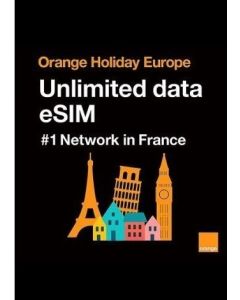
Unlimited Europe Data eSIM 1 - 30 Days
-
Unlimited high-speed data
-
Valid across 50+ European countries
-
No voice or SMS support
-
Ideal for data-only usage
-
Instant digital QR code activation
Click Here to Activate Unlimited Europe Data eSIM 1 - 30 Days
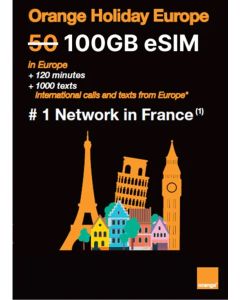
Orange Holiday 100GB Voice & Data Europe eSIM 30 Days
-
100GB high-speed data
-
120 mins + 1,000 SMS (outside Europe)
-
Unlimited calls/SMS within Europe
-
French phone number included
-
Supports hotspot/tethering
Click Here to Activate Orange Holiday 100GB Voice & Data Europe eSIM 30 Days
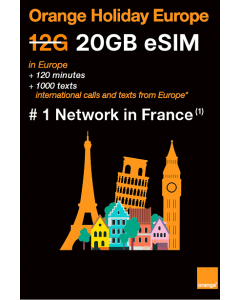
Orange Holiday 20GB Europe eSIM 30 Days
-
20GB on a 5G network
-
30-minute calls and 200 SMS (outside Europe)
-
Unlimited calls/SMS within Europe
-
French phone number included
-
Hotspot/tethering supported
Click Here to Activate Orange Holiday 20GB Europe eSIM 30 Days
Worldwide Holiday Data Only eSIM (20GB in Zone 1)
-
20GB high-speed data in over 100 destinations
-
Valid for 30 days
-
Data-only, no calls or SMS
-
Operates zone-wise
Click Here to Activate Worldwide Holiday Data Only eSIM (20GB Allowance in Zone 1)
eSIM-Compatible Devices by Brand
Apple (iPhone): iPhone XR, iPhone XS, iPhone XS Max, iPhone 11, iPhone 11 Pro, iPhone 11 Pro Max, iPhone SE 2 (2020), iPhone SE 3 (2022), iPhone 12, iPhone 12 Mini, iPhone 12 Pro, iPhone 12 Pro Max, iPhone 13, iPhone 13 mini, iPhone 13 Pro, iPhone 13 Pro Max, iPhone 14, iPhone 14 Plus, iPhone 14 Pro, iPhone 14 Pro Max, iPhone 15, iPhone 15 Plus, iPhone 15 Pro, iPhone 15 Pro Max, iPhone 16 Pro, iPhone 16 Pro Max, iPhone 17 Pro, iPhone 17 Pro Max
Samsung Galaxy: Galaxy Note20, Note20 5G, Note20 Ultra, Note20 Ultra 5G, Galaxy S20, S20 5G, S20+, S20+ 5G, S20 Ultra, S20 Ultra 5G, Galaxy S21, S21+ 5G, S21 Ultra 5G, Galaxy S22, S22+ 5G, S22 Ultra 5G, Galaxy Z Flip, Z Flip 5G, Z Flip3 5G, Z Flip4, Galaxy Z Fold2 5G, Galaxy Fold
Google Pixel: Pixel 2 (Google Fi only), Pixel 2 XL, Pixel 3 (excl. AU/TW/JP), Pixel 3 XL, Pixel 3a, Pixel 3a XL, Pixel 4, Pixel 4 XL, Pixel 4a, Pixel 5, Pixel 5a, Pixel 6, Pixel 6 Pro, Pixel 7, Pixel 7 Pro
Huawei: Huawei P40, P40 Pro, P50 Pro, Mate 40 Pro
Sony Xperia: Xperia 10 III Lite, Xperia 10 IV, Xperia 1 IV, Xperia 5 IV
Motorola: Razr 2019, Razr 2020, Razr 5G
Other Devices: Nuu Mobile X5, Gemini PDA, Rakuten Mini, Rakuten Big-S, Rakuten Big, Surface Pro X, Honor Magic 4 Pro, Fairphone 4
Countries Covered by UKTD Europe eSIM
Andorra, Azores, Aland Islands, Austria, Balearic Islands, Canary Islands, Belgium, Cyprus, Crete, Corfu, The Cyclades, Croatia, Czech Republic, Denmark, Estonia, Faeroe Islands, Finland, France Mainland, Gibraltar, Germany, Greece, Guernsey, Hungary, Ireland, Iceland, Italy, Jersey, Latvia, Liechtenstein, Lithuania, Luxembourg, Madeira, Malta, Isle of Man, Norway, Netherlands, Portugal, Poland, Rhodes, Romania, Spain, United Kingdom, San Marino, Sardinia, Sicily, Slovakia, Switzerland, Sweden, Vatican City.
This coverage allows smooth data access across borders in Europe with no extra roaming charges.
Frequently Asked Questions
1. What is the SM-DP+ address in eSIM?
It's a server address used by your device to download and activate your eSIM plan securely.
2. How do I get my SM-DP+ address?
Your provider will email it after purchase, along with your activation code and QR code.
3. Can I activate an eSIM without scanning a QR code?
Yes. You can enter the SM-DP+ address and activation code manually in your phone settings.
4. When should I activate an eSIM manually?
Manual activation helps when auto-activation fails or your phone doesn’t support QR code scans.
5. Does manual eSIM activation delete my data?
No. Manual activation installs the eSIM profile without touching your personal files.
6. What do I need to activate an eSIM?
You need an eSIM-compatible device, the SM-DP+ address, and an activation code from your provider.
7. How long does manual activation take?
Once you enter the SM-DP+ address and code, activation takes just a few minutes.
Need help with setup or choosing a plan? Go with Holiday eSIM for reliable eSIM options that actually work.